How to Reset Your TikTok Algorithm (All Methods)
In this article
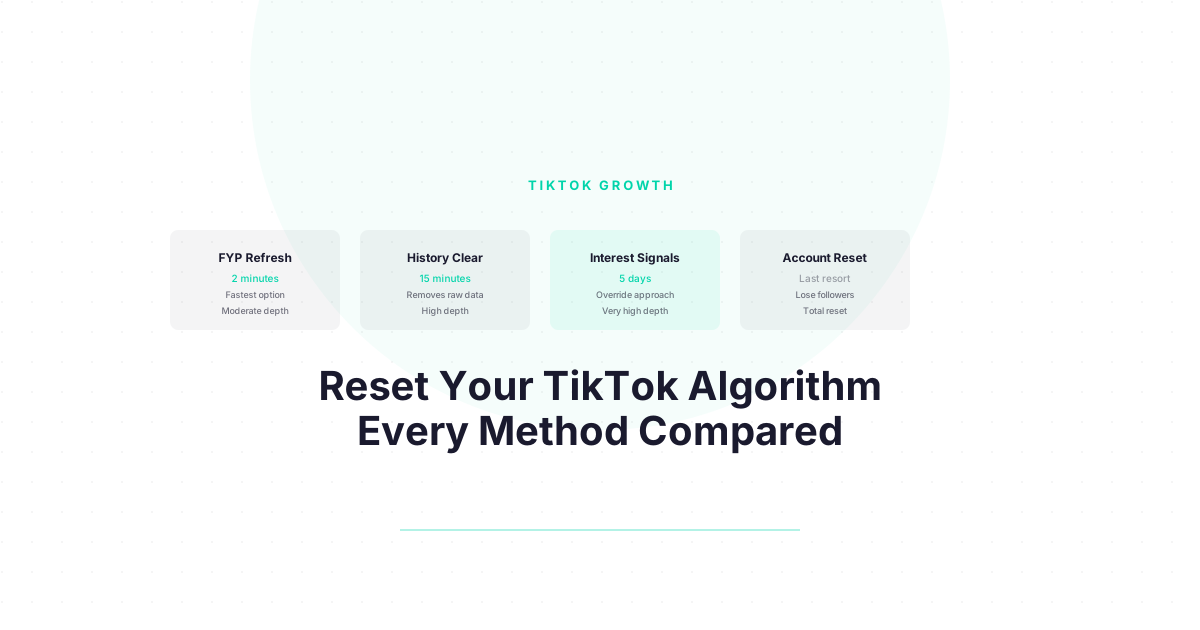
There is more than one way to reset your TikTok algorithm. Each method works differently, takes a different amount of time, and comes with different tradeoffs. This guide compares all four and helps you pick the right one for your situation.
What Does It Mean to Reset Your TikTok Algorithm?
Resetting your TikTok algorithm means clearing or overriding the interest model TikTok has built from your viewing behavior, so your For You Page starts fresh. TikTok’s system builds your interest profile from signals including watch time, completion rate, likes, follows, and explicit feedback. A reset either clears that history or actively retrains the system with new signals — these are meaningfully different approaches.
The TikTok algorithm is a personalization engine that learns from everything you do on the platform. It builds an interest graph — a map of what you care about — and uses it to predict which videos to surface next. When that interest graph is wrong, your FYP shows you content you hate.
A “reset” can mean one of two things:
- Clearing the graph — removing the bad data
- Overriding the graph — flooding it with better data until the old signals lose influence
Most people only know about option 1. Both work; the right choice depends on how broken your FYP is and how much time you have.
What Is the FYP Refresh Method and When Should You Use It?
The FYP Refresh is TikTok’s built-in reset option, found under Settings and Privacy → Content Preferences → Refresh your For You feed. It clears TikTok’s cached interest model and resets your FYP to a “new user” state. This is the fastest method, takes under two minutes, and is the right first choice when your FYP has drifted significantly off-topic in the past few days or weeks.
How it works: TikTok wipes the interest profile stored for your account and temporarily reverts recommendations to general trending content. Over the following 24-72 hours, it rebuilds based on whatever you watch next.
How to do it:
- Profile → Menu → Settings and Privacy → Content Preferences → Refresh your For You feed
What it does not reset: Watch history, search history, liked videos, follows. These signals can partially override the FYP reset if you do nothing else.
| Aspect | FYP Refresh |
|---|---|
| Time to complete | 2 minutes |
| Depth of reset | Moderate |
| What it clears | Cached interest profile |
| What it keeps | Watch history, likes, follows |
| Results visible | 24-48 hours |
| Reversible? | Yes |
Best for: FYP that drifted gradually over weeks. Less effective for severe algorithm corruption.
What Is the History Clear Method and How Does It Differ From the FYP Refresh?
The History Clear method involves deleting your watch history, search history, and optionally unliking past videos to remove the underlying data TikTok uses to build recommendations. Unlike the FYP Refresh, which clears the derived interest model, the History Clear removes the raw signal data that feeds it. Combining both methods is more effective than either alone.
The FYP Refresh is like wiping a derived document — the model TikTok built from your data. The History Clear removes the source files — the actual behavioral data that created the model.
How to do it:
- Profile → Menu → Settings and Privacy → Privacy → Search and Watch History
- Tap Clear Watch History
- Tap Clear Search History
- Optional: Go to your Liked Videos and unlike content from niches you want to escape
What it does not reset: Follows. Following an account sends TikTok a strong signal that you like that creator’s content. If you followed 50 cooking accounts during a phase, TikTok still knows you liked cooking.
| Aspect | History Clear |
|---|---|
| Time to complete | 5-15 minutes |
| Depth of reset | Moderate-High |
| What it clears | Watch history, search history, likes (if manual) |
| What it keeps | Follows, comments |
| Results visible | 48-72 hours |
| Reversible? | No (history is deleted) |
Best for: FYP that has developed a strong incorrect interest model over months. Combine with FYP Refresh for maximum effect.
Trying to grow on TikTok but not seeing results even after resetting your FYP? Download the free TikTok Algorithm Decoder — we break down every ranking signal with approximate weights so you know what to optimize. Free.
What Is the Interest Signal Method and When Is It Better Than Clearing History?
The Interest Signal method skips clearing history and instead floods TikTok with strong new behavioral signals: watching target content to 100% completion, saving and sharing on-topic videos, using “Not Interested” on off-topic content, and searching for topics you want more of. This retraining approach can shift your FYP in 3-5 days without deleting any data.
Instead of removing bad data, you drown it in good data. The interest signal method works because TikTok’s algorithm weights recent behavior more heavily than older behavior. If you send strong, consistent signals for five days, the old data loses its influence.
The protocol:
- Search for one topic you want TikTok to associate with you
- Watch every video that appears to 100% completion
- Save any video you find genuinely useful
- Share at least one video per session
- Long-press and select “Not Interested” on every off-topic video in your FYP
- Repeat for 15-20 minutes per day for five days
Why this sometimes works better than clearing:
If your FYP is mostly right but 20% off, clearing everything and rebuilding is overkill. The signal flooding method lets you keep the good personalization while correcting the specific areas that drifted.
| Aspect | Interest Signal Method |
|---|---|
| Time to complete | 15-20 min/day for 5 days |
| Depth of reset | High (for targeted corrections) |
| What it clears | Nothing — overrides instead |
| What it keeps | All existing history and preferences |
| Results visible | 3-5 days |
| Reversible? | Yes — just stop the protocol |
Best for: FYP that is partially correct but has specific problem areas. Also good for creators who want to shift into a new content niche.
What Is the Account Reset Method and Should You Ever Use It?
The Account Reset means deleting your TikTok account and creating a new one, which gives you a completely clean algorithmic slate. This is irreversible, costly in terms of followers and content lost, and rarely necessary. It is appropriate only in extreme cases: severe spam flag on your account, or intentional complete niche pivot where your existing audience would actively hurt your new direction.
This is the nuclear option. Before choosing it, understand what you actually lose:
- All followers and their relationship to your content
- All your posted videos and their performance history
- Your username (may be re-taken quickly)
- Any creator monetization status
- Your watch history and personalized FYP (which you could have reset with option 1)
| Aspect | Account Reset |
|---|---|
| Time to complete | 30 days cooling period before deletion is final |
| Depth of reset | Total |
| What it clears | Everything |
| What it keeps | Nothing |
| Results visible | Immediately (new account) |
| Reversible? | No |
Use this only when: your account has been flagged in a way that cannot be resolved, or you are a creator making a complete identity change where your existing follower base would actively work against your new niche.
Which Reset Method Should You Choose?
For most users, the right approach is: FYP Refresh + History Clear (done together on day one), followed by five days of the Interest Signal method to actively retrain. This three-part sequence addresses both the cached model and the underlying data, then rebuilds with fresh signals. Full account reset is only warranted in extreme circumstances.
Decision guide:
| Situation | Recommended Method |
|---|---|
| FYP drifted recently (past week) | FYP Refresh alone |
| FYP has been wrong for months | FYP Refresh + History Clear |
| FYP is partially right, specific areas wrong | Interest Signal method |
| Starting a new content niche as creator | Interest Signal method (targeted) |
| Account spam-flagged, monetization affected | Consider Account Reset |
| Just want a cleaner FYP without losing history | Interest Signal method only |
For the step-by-step version of the combined approach, see How to Reset Your TikTok Algorithm. For a creator-specific diagnostic when your content views have dropped, see How to Fix Your TikTok Algorithm.
Now That You Understand How the TikTok Algorithm Works — Use It to Grow
You came here to fix your FYP. But here is what most people miss: the same system that decides what you see also decides who sees YOUR content.
Everything you just learned about how TikTok ranks and recommends videos? Those exact signals — completion rate, watch time, shares, follows — are the same ones the algorithm uses to decide whether your videos reach 500 people or 500,000.
Think about it:
- Completion rate does not just affect your FYP. It is the number one signal TikTok uses to decide whether to push your video to a wider audience.
- Shares are not just engagement. They are the strongest signal that your content has value beyond your existing followers.
- The signals you just learned to retrain your own FYP are the exact signals you need to optimize in your own content.
If you are a creator — or thinking about becoming one — you now have something most TikTok creators spend months figuring out: a clear picture of how the algorithm actually decides who gets seen.
The question is: what are you going to do with that knowledge?
Next step: Download the free algorithm decoder — we break down the signals with approximate weights. Get it here
Frequently Asked Questions
How do I reset my TikTok algorithm completely?
For a complete reset, combine two steps on the same day: use the built-in FYP Refresh (Settings → Content Preferences → Refresh your For You feed) and clear your watch and search history (Settings → Privacy → Search and Watch History). Then spend 15-20 minutes per day for five days watching only content you want more of, to completion, to retrain the algorithm with fresh signals.
What is the fastest way to reset the TikTok algorithm?
The built-in FYP Refresh (Settings → Content Preferences → Refresh your For You feed) takes under two minutes and produces visible FYP changes within 24-48 hours. It is the fastest single action you can take. For deeper or longer-lasting results, combine it with clearing your watch and search history on the same day.
Will clearing watch history reset my TikTok algorithm?
Clearing your watch history removes historical viewing signals but does not by itself reset the cached interest model TikTok has already built. For best results, combine clearing watch history with the built-in FYP Refresh. Clearing watch history alone will gradually shift your recommendations over a week or two, but the FYP Refresh accelerates that process significantly.
Can I reset TikTok algorithm without losing followers?
Yes. The FYP Refresh, History Clear, and Interest Signal methods all reset your personalization without affecting your followers, following list, or posted content. Only deleting your account removes followers. For most people, the FYP Refresh plus history clear achieves a complete reset without losing anything.
Does the TikTok algorithm reset work the same on iOS and Android?
The built-in FYP Refresh and history clear options are available on both iOS and Android through the same settings path. Interface labels may vary slightly across app versions, but the core functionality is identical. The TikTok web version has limited reset options; use the mobile app for the most complete access to reset features.
Keep Reading
- How to Reset Your TikTok Algorithm in 2026 (Step-by-Step) — The comprehensive step-by-step guide to the full reset process
- How to Clear Your TikTok Algorithm History — Deep dive on the history clear method: exactly what gets removed and what does not
- How to Fix Your TikTok Algorithm When It Stops Working — Creator-focused diagnostic guide for when your views have dropped
What to Do Next
Choose the path that fits where you are right now.
Pick Your Niche
Download the free Instagram Algorithm Decoder. See the 6 signals Instagram uses to rank your content, their approximate weights, and a self-audit to score your last 10 posts.
Download FreeStart Building
Read the step-by-step setup guide for your platform.
Get Weekly Tactics
One tip, one tool, one case study. Every Tuesday.
Free. No spam. Unsubscribe anytime.