How to Reset the Algorithm on TikTok
In this article
Your FYP is wrong and you need it fixed now. Skip the theory. Here is the fastest method to reset the algorithm on TikTok, what you can do in the next five minutes, and a check at the end to confirm it worked.
What Is the Fastest Way to Reset the Algorithm on TikTok?
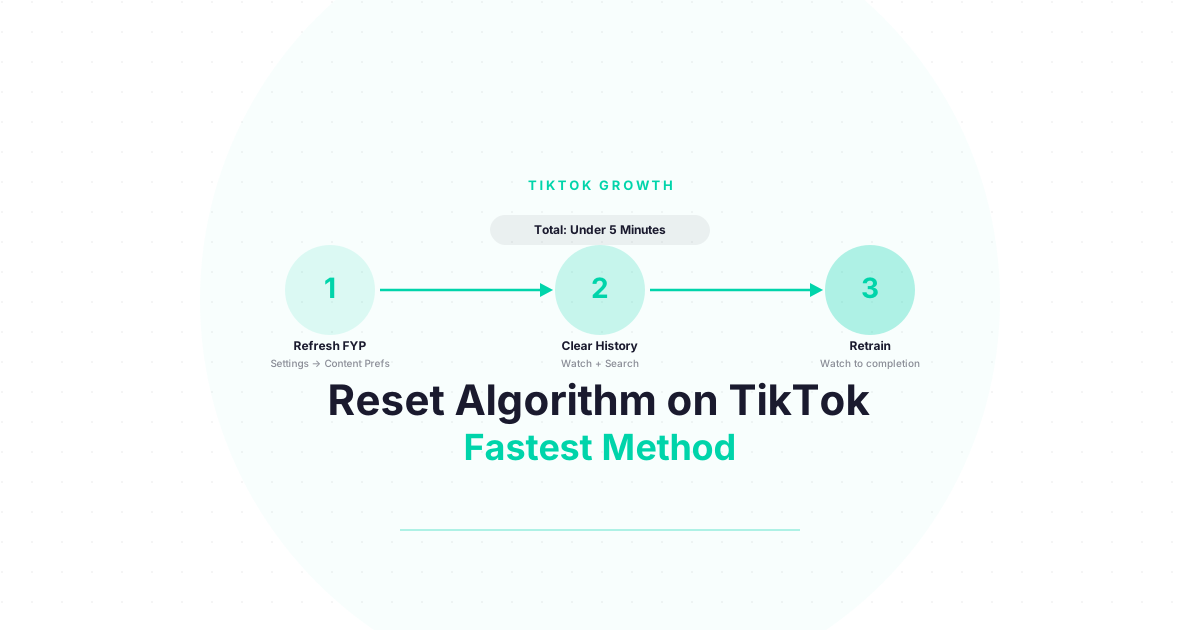
The fastest TikTok algorithm reset takes under five minutes: open Settings and Privacy → Content Preferences → Refresh your For You feed, then immediately clear your watch history and search history under Settings and Privacy → Privacy → Search and Watch History. These two actions together clear TikTok’s cached interest model and remove the underlying behavioral data that feeds it.
The full reset is a two-part action done back-to-back. Most guides only tell you about the FYP Refresh — that is the first part. Clearing your watch history immediately after is the second part, and it makes the reset last longer.
Here is exactly how to do both right now:
Part 1 — FYP Refresh (2 minutes):
- Open TikTok → tap your Profile icon
- Tap the three horizontal lines (top right)
- Go to Settings and Privacy
- Tap Content Preferences
- Tap Refresh your For You feed
- Confirm
Part 2 — History Clear (2 minutes):
- Back in Settings and Privacy, tap Privacy
- Scroll to Search and Watch History
- Tap Clear Watch History → confirm
- Tap Clear Search History → confirm
Total time: under five minutes. The FYP change is visible within 24 hours.
What Can You Do Right Now vs. What Takes a Week?
The FYP Refresh and history clear take effect within 24-48 hours and represent the fastest visible change you can make today. Full retraining of your interest profile — getting TikTok to accurately reflect your current interests — takes five to seven days of consistent viewing behavior. The reset creates the conditions; your viewing habits over the next week determine the outcome.
| Action | Time to Do | When You See Results |
|---|---|---|
| FYP Refresh | 2 minutes | 24-48 hours |
| Clear watch history | 2 minutes | 24-48 hours |
| Clear search history | 1 minute | 24-48 hours |
| “Not Interested” on off-topic videos | 10 min/day | 2-3 days |
| Watch target content to completion | 15 min/day | 3-5 days |
| Full FYP retraining complete | Passive | 5-7 days |
The most important thing you can do in the first 24 hours after resetting: watch content you actually want more of. Every video you watch to completion immediately after the reset has an outsized influence on your new interest profile because there is no competing historical data.
Does Clearing Your TikTok Cache Reset the Algorithm?
No. Clearing your TikTok app cache removes temporary local files and can improve app performance, but it does not reset your algorithm. Your interest profile is stored on TikTok’s servers, not your device — a fact TikTok’s official documentation confirms explicitly. Only the built-in FYP Refresh (in Settings) clears the server-side recommendation profile. Cache clearing is a performance fix, not an algorithm fix.
This is one of the most common misconceptions. Here is the difference:
- App cache = temporary files on your device (thumbnails, buffered video data)
- Algorithm profile = your interest model stored on TikTok’s servers
Clearing the cache on your phone removes the local files. TikTok’s servers still have your complete history, interest profile, and behavioral data. When you reopen the app, it pulls fresh data from those same servers.
To actually clear the algorithm, you need to use the in-app reset options described above.
Struggling to get views even after trying these fixes? Download the free TikTok Algorithm Decoder — we break down every ranking signal with approximate weights so you know exactly what to optimize. Free.
What Are the Biggest Mistakes People Make When Trying to Reset TikTok?
The three most common mistakes when resetting TikTok’s algorithm: doing the FYP Refresh without also clearing watch history (the reset is weaker without removing source data), immediately binging unrelated content after the reset (you erase your own work), and expecting instant results (the visible FYP shift takes 24-48 hours, with full retraining taking a week).
Mistake 1: Only doing the FYP Refresh without clearing history. The refresh clears the cached model, but if your watch history is still full of the wrong content, TikTok partially rebuilds the same interest profile within days.
Mistake 2: Watching random content immediately after the reset. The 24 hours after your reset are the highest-leverage period. What you watch in that window heavily influences what TikTok builds your new profile around.
Mistake 3: Not being active with “Not Interested.” The reset gets you back to neutral. “Not Interested” is how you steer. Use it aggressively for the first three days on any content that is not what you want to see.
Mistake 4: Expecting a cache clear to work. Already covered above, but worth repeating — clearing cache does nothing to your algorithm.
How Do You Know If the TikTok Algorithm Reset Worked?
The reset worked if your FYP shows noticeably different content within 24-48 hours of completing the steps — specifically, a shift toward generic trending content rather than your previous niche. This is normal immediately after reset. Over the following five to seven days, your FYP should converge on your target interests if you have been watching the right content to completion and using “Not Interested” on off-topic videos.
Your three checkpoints:
Check 1 (24 hours after reset): Does your FYP look different? If you still see exactly the same content with no variation, the reset may not have been completed properly. Recheck that you completed both the FYP Refresh and the history clear.
Check 2 (day 3-4): Is your FYP improving? You should see a noticeable shift toward your target topics if you have been actively watching that content and using “Not Interested.”
Check 3 (day 7): Is your FYP accurate? By day seven of consistent behavior, the algorithm should have rebuilt an accurate interest profile around your current preferences.
If the algorithm has not improved after seven days of consistent effort, the issue may be more complex. See How to Fix Your TikTok Algorithm for a diagnostic guide, and Every Method Explained for alternative approaches.
For other platforms, the Audience Growth Hub covers algorithm mechanics across Instagram, YouTube, and beyond.
Now That You Understand How the TikTok Algorithm Works — Use It to Grow
You came here to fix your FYP. But here is what most people miss: the same system that decides what you see also decides who sees YOUR content.
Everything you just learned about how TikTok ranks and recommends videos? Those exact signals — completion rate, watch time, shares, follows — are the same ones the algorithm uses to decide whether your videos reach 500 people or 500,000.
Think about it:
- Completion rate does not just affect your FYP. It is the number one signal TikTok uses to decide whether to push your video to a wider audience.
- Shares are not just engagement. They are the strongest signal that your content has value beyond your existing followers.
- The signals you just learned to retrain your own FYP are the exact signals you need to optimize in your own content.
If you are a creator — or thinking about becoming one — you now have something most TikTok creators spend months figuring out: a clear picture of how the algorithm actually decides who gets seen.
The question is: what are you going to do with that knowledge?
Next step: Download the free algorithm decoder — we break down the signals with approximate weights. Get it here
Frequently Asked Questions
How do you reset the algorithm on TikTok fast?
The fastest method: open Settings and Privacy → Content Preferences → Refresh your For You feed, then immediately clear your watch history and search history under Settings and Privacy → Privacy → Search and Watch History. Both steps take under five minutes. Visible FYP changes appear within 24-48 hours.
Will reinstalling TikTok reset the algorithm?
No. TikTok’s algorithm profile is stored on TikTok’s servers, not your device. Reinstalling the app does not clear your interest profile, watch history, or search history. Use the built-in reset options in the app’s Settings and Privacy section to actually reset your algorithm.
How long does a TikTok algorithm reset take to show results?
You should see a visible FYP change within 24-48 hours of completing the FYP Refresh and history clear. Full retraining — where your FYP accurately reflects your current interests — takes five to seven days of consistent viewing in your target niche, plus active use of “Not Interested” on off-topic content.
Can you reset TikTok algorithm without an account?
If you are not logged in to TikTok, your FYP is based on device-level signals and general trending content. There is no account-level algorithm to reset. Logging in allows TikTok to build a personalized interest profile and gives you access to the reset tools. For a personalized experience, use a logged-in account.
Does the TikTok FYP Refresh permanently delete your history?
The FYP Refresh clears TikTok’s cached interest model but does not permanently delete your watch history. Your watch history remains visible under Privacy → Search and Watch History. To actually delete the history, use the “Clear Watch History” option separately. The FYP Refresh is about resetting the recommendation engine; clearing history is about removing the source data.
What Should You Watch After Resetting TikTok to Retrain It Correctly?
After resetting, watch only content from your target niche — searched intentionally or already in your FYP — and watch each video to 100% completion. Save at least one video per session. The first 24-48 hours after a reset are the highest-leverage window: TikTok’s interest model is blank, so every signal you send has an outsized influence on the new profile being built.
The type of content you watch immediately after the reset matters more than anything else you do. TikTok begins rebuilding your interest profile from the moment you start viewing post-reset. With no historical data competing for influence, your fresh signals carry maximum weight.
What to watch:
- Content from the specific niche you want TikTok to associate with you
- Longer videos (30 seconds or more) that you can watch to completion — long completions send stronger signals than short ones
- Content from accounts you find genuinely useful — if you follow two or three of them immediately after the reset, you accelerate the retraining
What to avoid:
- Trending content outside your target niche, even if it is entertaining
- Content that appears randomly in your recovering FYP that is off-topic — use “Not Interested” instead of watching
- Using TikTok LIVE for passive background noise — live watch time does not send the same quality signals as on-demand video completion
The more deliberate you are in the first two days, the less active effort you need in days three through seven.
If you also want to grow on other platforms, the principles are similar. The Audience Growth Hub covers audience-building mechanics across TikTok, Instagram, YouTube, and beyond — the core logic of completion rate and behavioral signals transfers.
Keep Reading
- How to Reset Your TikTok Algorithm in 2026 (Step-by-Step) — The comprehensive guide with full details on every reset method
- How to Reset Your TikTok Algorithm: Every Method Explained — Method comparison guide to help you choose the right approach
- How to Clear Your TikTok Algorithm History — Deep dive on history removal: what clearing each type of history actually does
What to Do Next
Choose the path that fits where you are right now.
Pick Your Niche
Download the free Instagram Algorithm Decoder. See the 6 signals Instagram uses to rank your content, their approximate weights, and a self-audit to score your last 10 posts.
Download FreeStart Building
Read the step-by-step setup guide for your platform.
Get Weekly Tactics
One tip, one tool, one case study. Every Tuesday.
Free. No spam. Unsubscribe anytime.