How to Clear Your TikTok Algorithm
In this article
Clearing your TikTok history is not the same thing as clearing your TikTok algorithm. Most people do one when they mean the other. This guide breaks down exactly what each type of history stores, what clearing it actually removes, and the right sequence if you want to start fresh.
What Is TikTok’s Algorithm History and How Is It Stored?
TikTok stores multiple types of behavioral history that feed into its recommendation algorithm: watch history (videos you completed or partially watched), search history (topics and accounts you searched), liked videos (explicit positive signals), and your follow list (the strongest long-term interest signal). These are distinct data types stored on TikTok’s servers. Clearing one type does not clear the others — each must be cleared separately.
TikTok’s algorithm history is a collective term for all the behavioral data TikTok has recorded from your account. This data lives on TikTok’s servers, not your device. There are four distinct types:
Watch history — the record of videos you watched (partially or completely), how long you watched each one, and whether you rewatched any. This is the primary source of data for building your interest profile.
Search history — the terms and accounts you have searched for. Searches signal active curiosity, which TikTok weighs heavily as an interest indicator.
Liked videos — the explicit record of every video you have double-tapped or tapped the heart on. Likes are an explicit positive signal.
Follow list — every account you follow. This is not typically categorized as “history” but it is the strongest sustained interest signal TikTok holds on your account.
Clearing your TikTok algorithm history means removing or weakening as many of these signals as possible.
What Does Clearing TikTok Watch History Actually Do?
Clearing your TikTok watch history removes the record of videos you have watched from TikTok’s server-side history log. This weakens the interest signals those watches generated, but does not immediately destroy TikTok’s existing interest model — the algorithm has already processed those signals into your recommendation profile. The FYP Refresh option in Content Preferences is required to clear the derived interest model itself.
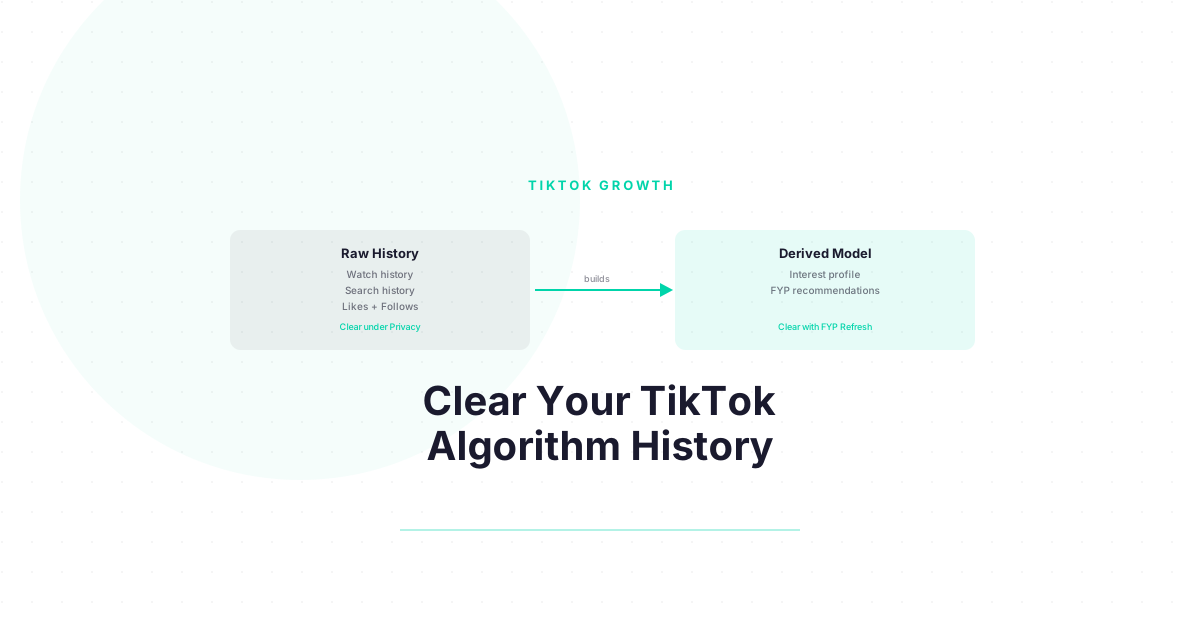
This is the critical distinction most guides miss. Think of it in two layers:
- Layer 1: Raw data — your watch history, search history, liked videos (the source files)
- Layer 2: Derived model — the interest profile TikTok built from those source files (the cached output)
Clearing your watch history removes Layer 1 data — a process detailed in TikTok’s privacy and data settings documentation. But TikTok has already used that data to build your Layer 2 interest profile. Until you also clear the derived model (using the FYP Refresh), TikTok’s recommendation engine is still running on the profile it built from your history.
How to clear watch history:
- Profile → Menu → Settings and Privacy
- Tap Privacy
- Tap Search and Watch History
- Tap Clear Watch History
What Does Clearing TikTok Search History Do to the Algorithm?
Clearing your TikTok search history removes the record of topics and accounts you have searched, which weakens the topical interest signals generated by those searches. Searches carry higher weight in TikTok’s interest model than passive views because they represent deliberate topic intent — you actively sought out that content. Clearing search history removes this intentional signal from the data pool.
Search history is underrated as an algorithmic signal. When you search for a topic on TikTok, you are sending a deliberate interest signal — stronger than passively watching a video that appeared in your FYP. TikTok’s system uses search patterns to infer what you are actively seeking, not just what you accidentally watched.
How to clear search history:
- Profile → Menu → Settings and Privacy → Privacy → Search and Watch History
- Tap Clear Search History
Or directly from the search tab: tap the search bar, then tap Clear next to your recent searches.
What Happens When You Clear TikTok Cache vs. Clear History?
Clearing TikTok’s app cache removes temporary local files stored on your device — thumbnails, buffered videos, and temporary data — but has zero effect on your algorithm. Your algorithm profile is stored on TikTok’s servers. Cache clearing improves app performance and frees storage space. Clearing watch history and search history (under Privacy settings) actually removes algorithmic data from TikTok’s servers.
This comparison creates the most confusion:
| Action | What It Clears | Effect on Algorithm |
|---|---|---|
| Clear app cache | Local device files (thumbnails, buffers) | None |
| Clear watch history | Server-side viewing record | Weakens interest signals |
| Clear search history | Server-side search record | Removes intentional topic signals |
| FYP Refresh | Derived interest model (cached profile) | Resets recommendation engine |
| Unlike videos | Explicit positive signals from likes | Weakens like-based interest data |
| Unfollow accounts | Long-term follow-based interest signals | Weakens strongest sustained signals |
How to clear cache (not algorithm):
- Profile → Menu → Settings and Privacy
- Tap Free up space
- Tap Clear cache
This is a device performance action, not an algorithm action.
Want to understand exactly which signals TikTok uses — and which ones you can control? Download the free TikTok Algorithm Decoder — signal breakdown with approximate weights, explained simply. Free.
What Is the Most Thorough Way to Clear Your TikTok Algorithm?
The most thorough TikTok algorithm clear combines all actions in sequence: clear watch history, clear search history, unlike old videos in niches you want to leave, consider unfollowing off-topic accounts, then run the FYP Refresh (Settings → Content Preferences → Refresh your For You feed) to clear the derived interest model. Done in this order, each step reinforces the next.
The full clear sequence, most thorough version:
Step 1: Clear watch history Profile → Menu → Settings and Privacy → Privacy → Search and Watch History → Clear Watch History
Step 2: Clear search history Same path → Clear Search History
Step 3: Review liked videos (optional, time-consuming) Profile → tap the heart/likes tab → manually unlike videos from niches you want to exit
Step 4: Review follows (optional, highest impact) Profile → Following → unfollow accounts that represent niches you no longer want TikTok to associate with you
Step 5: Run FYP Refresh (required) Profile → Menu → Settings and Privacy → Content Preferences → Refresh your For You feed
Step 5 is non-optional. The previous steps remove source data; step 5 clears the derived model. Skipping it means TikTok’s recommendation engine is still running the old profile even after you removed the data that created it.
How Long Does It Take to See Changes After Clearing Your TikTok Algorithm?
After clearing all history types and running the FYP Refresh, visible FYP changes appear within 24-48 hours. The FYP will initially show general trending content rather than personalized recommendations — this is normal and expected. Full retraining to an accurate, personalized FYP takes five to seven days of consistent viewing behavior in your target area.
The timeline:
| Time After Clear | Expected FYP State |
|---|---|
| Immediate | No visible change yet |
| 24 hours | Generic trending content dominates FYP |
| 48 hours | First signals of your new viewing behavior appear |
| Day 3-5 | Clear niche pattern emerging if you have been consistent |
| Day 7+ | FYP accurately reflects current interests |
The clearing process creates a neutral starting point. What you do after the clear is what determines your new FYP. See How to Reset Your TikTok Algorithm for the full retraining protocol.
Now That You Understand How the TikTok Algorithm Works — Use It to Grow
You came here to fix your FYP. But here is what most people miss: the same system that decides what you see also decides who sees YOUR content.
Everything you just learned about how TikTok ranks and recommends videos? Those exact signals — completion rate, watch time, shares, follows — are the same ones the algorithm uses to decide whether your videos reach 500 people or 500,000.
Think about it:
- Completion rate does not just affect your FYP. It is the number one signal TikTok uses to decide whether to push your video to a wider audience.
- Shares are not just engagement. They are the strongest signal that your content has value beyond your existing followers.
- The signals you just learned to retrain your own FYP are the exact signals you need to optimize in your own content.
If you are a creator — or thinking about becoming one — you now have something most TikTok creators spend months figuring out: a clear picture of how the algorithm actually decides who gets seen.
The question is: what are you going to do with that knowledge?
Next step: Download the free algorithm decoder — we break down the signals with approximate weights. Get it here
Frequently Asked Questions
How do you clear your TikTok algorithm?
Clear your algorithm through two complementary actions: first remove source data (watch history and search history under Settings and Privacy → Privacy → Search and Watch History), then clear the derived interest model (Settings and Privacy → Content Preferences → Refresh your For You feed). Both steps are needed — removing source data without refreshing the FYP leaves the old recommendation model in place.
Is clearing TikTok cache the same as clearing the algorithm?
No. Clearing the TikTok app cache removes temporary local files on your device and has no effect on your algorithm. Your algorithm data is stored on TikTok’s servers. To actually clear algorithmic data, use the watch history and search history options under Privacy settings, plus the FYP Refresh under Content Preferences.
Can you clear TikTok history without losing your account?
Yes. Clearing your watch history, search history, and liked videos does not affect your account, followers, following list, or posted content. These are behavioral data records, not account identity data. You can clear all of them and your account remains intact with all followers and content preserved.
What is the difference between clearing TikTok history and resetting TikTok algorithm?
Clearing history removes the source behavioral data (what you watched, searched, and liked). Resetting the algorithm (FYP Refresh) clears the derived recommendation model built from that data. Clearing history weakens future rebuilds of the model but does not immediately reset your FYP. Resetting the algorithm immediately changes your FYP but does not remove the underlying history data. Both together create the most complete reset.
Does clearing TikTok history improve the FYP?
Clearing history improves your FYP indirectly and over time — it removes the data source that was producing off-topic recommendations, so as the algorithm rebuilds, it has less bad data to draw from. For a faster, more immediate FYP improvement, pair the history clear with the FYP Refresh option in Content Preferences, which clears the derived model rather than just the source data.
Keep Reading
- How to Reset Your TikTok Algorithm in 2026 (Step-by-Step) — The complete reset protocol including retraining steps after clearing history
- How to Reset Your TikTok Algorithm: Every Method Explained — Method comparison guide showing how clearing compares to other reset approaches
- How to Change Your TikTok Algorithm — After you clear, use this guide to actively train your FYP toward exactly what you want
What to Do Next
Choose the path that fits where you are right now.
Pick Your Niche
Download the free Instagram Algorithm Decoder. See the 6 signals Instagram uses to rank your content, their approximate weights, and a self-audit to score your last 10 posts.
Download FreeStart Building
Read the step-by-step setup guide for your platform.
Get Weekly Tactics
One tip, one tool, one case study. Every Tuesday.
Free. No spam. Unsubscribe anytime.