
In this article
The Instagram Explore page is where strangers find you. It shows posts from accounts people don’t follow yet, which makes it one of the few places on Instagram built to send you new followers. You can’t apply for a spot. You can make your posts easier to recommend, and this guide shows you how, using what Instagram itself says it ranks.
Before You Start
- A public account. Posts from a private account can only be seen by approved followers, so Instagram has no way to recommend them to strangers.
- A Creator or Business account, if you can. Instagram’s published eligibility rules don’t mention account type, but you need one to see the Insights used in Step 7.
- The latest version of the Instagram app. Icons and menu names move between versions, and this guide flags where yours may differ.
- One topic. Decide the single subject you want strangers to know you for. Steps 3 and 4 depend on it.
Step 1: Open Your Explore Page and Tune It to Your Niche
Tap the search icon (the magnifying glass) in the bottom bar. Instagram’s own Search and Explore page says people reach Explore through the search icon, and the grid of posts appears below the search bar. If your bar looks different, look for the magnifying glass.
What you see is personal. Per Instagram’s ranking explainer , the grid is made of photos and videos from accounts you don’t follow yet, picked from your past activity: posts you’ve liked, saved, shared and commented on. Two people rarely see the same grid.
That works in your favor, because you can shape your own Explore into a research tool. Spend one sitting on this:
- Scroll your Explore page and note what is working in your niche: which formats (Reels, carousels, single photos), how the first frame hooks you, how long the captions run.
- Search a few phrases your ideal follower would type, and study the top posts.
- Save and share the posts that fit your niche. Instagram says that when you interact with a specific type of post, it tries to show you more content like it.
- On off-topic posts, tap the three dots and choose Not interested.
If your Explore page is far off topic, the full walkthrough is in how to reset your Instagram algorithm .
Step 2: Check That Your Account Can Be Recommended
Before you change anything else, confirm Instagram is allowed to recommend you. Open your profile, tap the menu, and look for Account status (in most versions it sits under Settings and activity). Instagram’s creator guidance says Account Status shows whether your account or its content is eligible to be recommended to non-followers.
If you’re not eligible, Account Status points to the content or parts of your profile causing it. Instagram says you can fix that by editing or deleting the content, or ask its review team to take another look.
Know the rules, too. Instagram holds recommendations to a higher standard than regular posting. Content that breaks its Recommendation Guidelines can still go to your followers in Feed and Stories, but Instagram tries not to recommend it to non-followers in Explore, Search and Reels. The Recommendations on Instagram page lists the categories, including content about self-harm, violence, sexually suggestive content, regulated products such as tobacco and vaping, and promotion of weight-loss products or cosmetic surgery.
If your niche touches any of those, read that page closely before you plan your content.
Step 3: Build Each Post Around Saves and Shares
Instagram’s ranking explainer says Explore ranks posts by predicting what each viewer will do with them. The most important actions it predicts are likes, saves and shares. It also says a post’s popularity (how many people like, comment on, share and save it, and how quickly) matters much more in Explore than in Feed or Stories.
Here are the four signals Instagram lists for Explore, in rough order of importance:
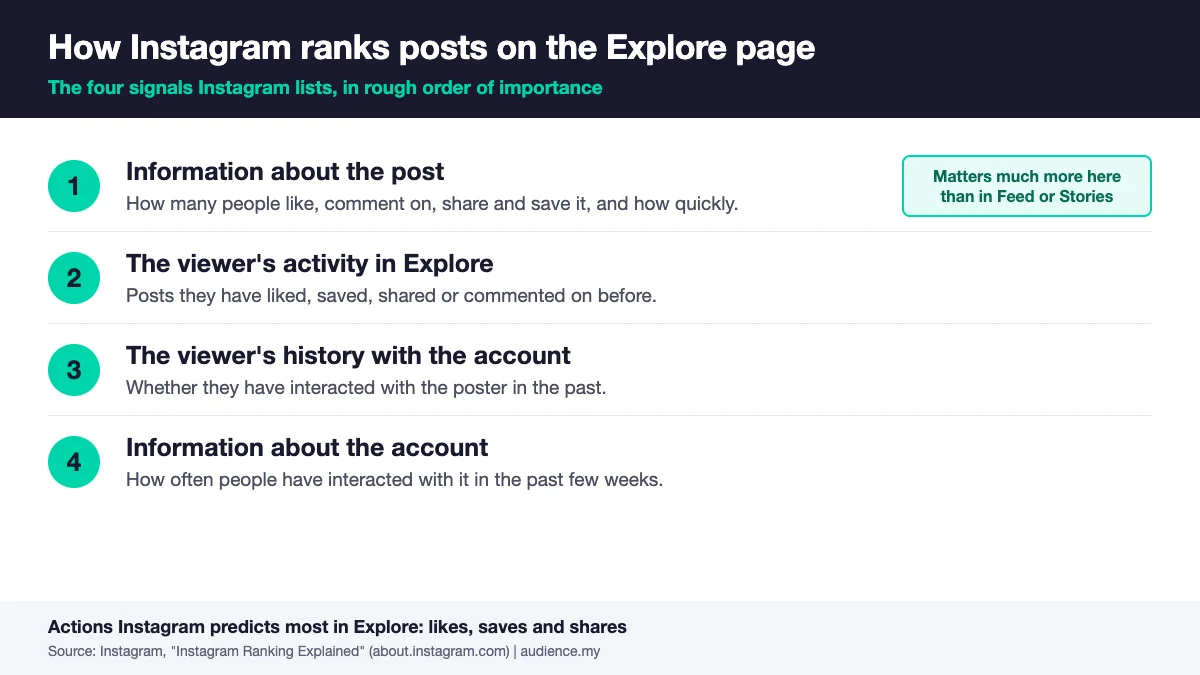
In practice, a post Explore can carry is one that strangers react to quickly, without knowing you. Saves and shares usually take more intent than a tap on the heart, so build for them on purpose:
- For saves: make something people will want to come back to. Checklists, step-by-step carousels, templates, settings, lists. Put the payoff, such as the full list or the exact settings, on the last slide.
- For shares: make something a friend needs to see. A relatable moment, a clear opinion, a “send this to the friend who…” post.
- For both: finish the idea inside the post. If the value lives behind a link or a DM, there is nothing to save or share.
For example, a photographer could post a five-slide carousel on camera settings for low-light portraits, with the settings on the last slide. That is a save. A clean before-and-after of the same shot is a share.
Signal four looks at how often people have interacted with your account in the past few weeks. Instagram doesn’t set a posting schedule, but a steady rhythm of posts people react to should help more than one big post followed by silence.
Step 4: Make Your Topic Obvious in the First Second
Explore matches posts to people based on what those people have interacted with before. A post with an unclear subject is harder to match, and a viewer who doesn’t recognize the subject scrolls past, which costs you the early reactions from Step 3. Instagram doesn’t publish a rule about niches. This is our reading of how those signals fit together.
Make the subject unmissable:
- Put the topic in the first frame. Use on-screen text or a visual that says what the post is about at a glance.
- Open the caption with the topic in plain words. Save the joke or the teaser for line two.
- Use the words a viewer would search. Instagram’s creator guidance says relevant keywords in your content, caption, bio and hashtags help people find you through Search.
- Stay on one topic long enough for a pattern to form. A profile that mixes photography, crypto and meal prep gives a new visitor no clear reason to follow.
Step 5: Use Clean, Original Files
Instagram says it is less likely to recommend reposts of a reel that’s already on Instagram, content with noticeable watermarks, and accounts that regularly collect and reshare other people’s content. If you want to build on someone else’s idea, its guidance is to use the Remix tool to add your own take instead of reposting.
For video, Instagram’s ranking explainer names the kinds of reels it makes less visible: low-resolution, watermarked, muted, bordered, mostly text, or already posted on Instagram. Explore shows videos too, so treat that list as your export checklist:
- Shoot and export in the best quality your phone allows.
- Never upload a clip that carries another app’s logo.
- Add sound. Even a light track or a voiceover beats a muted clip.
- Fill the frame. No borders or letterbox bars.
- Keep text as support. On-screen text should sharpen the video, not replace it.
- Keep Reels short. Instagram’s creator guidance says reels must be 3 minutes or less to be recommended.

Step 6: Give Each Post a Fast Start
Instagram weighs how quickly people react, so the first stretch after you publish matters. It doesn’t publish an exact window, so treat this as a routine, not a countdown:
- Post when your followers are online. They are your first audience, and their reactions start the clock. Find your peak hours with how to find the best time to post on Instagram .
- Stay in the comments. Reply as comments arrive. Comments are one of the popularity signals Instagram lists, and how to increase Instagram engagement covers how to earn them.
- Share the post to your Stories. That puts it in front of followers who missed it in Feed.
- Use a Collab post when it fits. Instagram says a Collab post, one post shared to both creators’ followers, can be recommended in the Reels tab, Explore and Feed. Here is how to create an Instagram collab post .
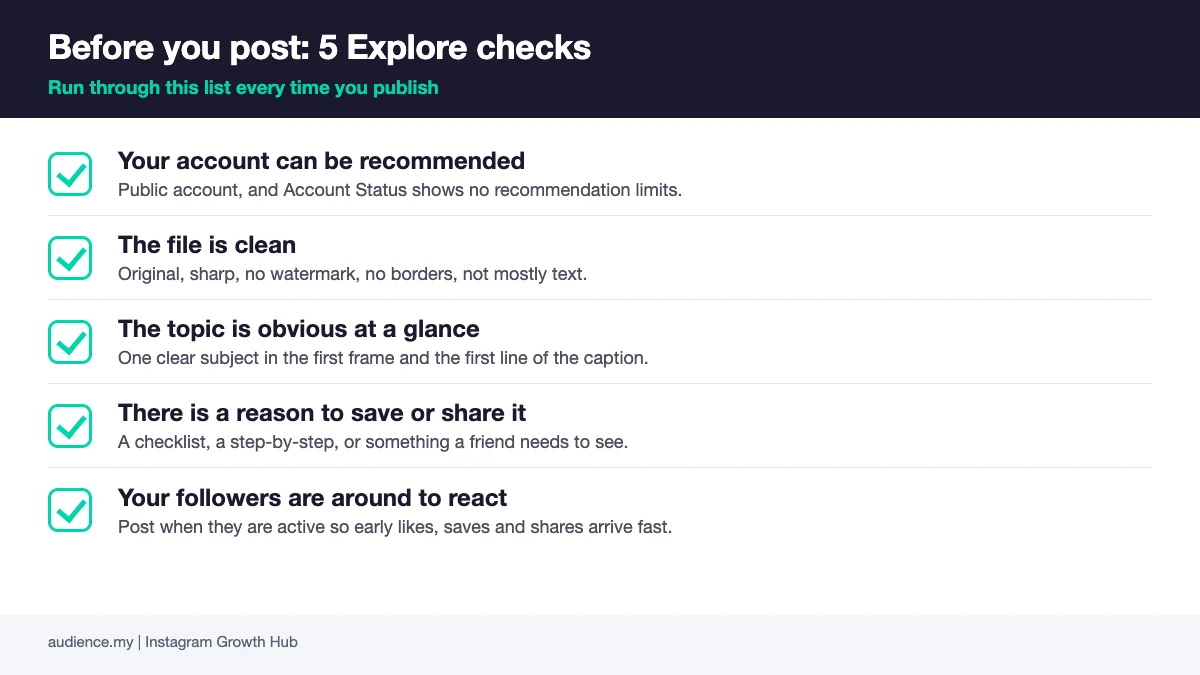
Here is the whole routine on one card. Save it and run it before every post:
Step 7: Track Non-Follower Reach and Repeat What Works
Open Insights. Instagram’s creator guidance says you can break down Accounts Reached by followers and non-followers, see how much of your reach comes from people who don’t already follow you, and track it over time by changing the time frame.
Treat that non-follower number as your progress report. It also counts Reels, Search and other recommendation surfaces, so it is a broad measure of Explore-style reach, not a pure Explore count. On individual posts, Insights can also show where reach came from. Look for Explore in that list, though labels change between app versions.
Then keep a simple log with one row per post: date, format, topic, non-follower reach, saves and shares. After a few weeks, sort by non-follower reach and copy the pattern of the top posts: the format, the topic, the hook.
Want a structured way to run the audit? The free Instagram Algorithm Decoder gives you a scorecard for your last 10 posts against the signals Instagram ranks on.
Common Mistakes
1. Posting Only for People Who Already Follow You
Inside jokes, references to old posts and captions that assume context can land with followers and fall flat with strangers. Explore shows your post to people with no history with you, so it has to make sense cold. Before you publish, ask whether someone who has never seen your profile would get it.
2. Reposting Other People’s Content or Leaving Watermarks
Instagram says it is less likely to recommend reposted reels, watermarked content and accounts that collect and reshare others’ posts. A clip with another app’s logo in the corner can reach your followers and still stay out of Explore. Export clean, or use Remix to add your own angle.
3. Buying Likes or Joining Engagement Pods
Explore matches posts to people based on their interests. Likes from bought accounts or pod members don’t come from the strangers Explore would show your post to next, so they add noise to the signals instead of proof that your post deserves a wider audience. Real saves and shares from real viewers are what the ranking looks for.
4. Ignoring Account Status Until Reach Drops
Content that breaks the Recommendation Guidelines can reach your followers while quietly staying out of recommendations. If your reach to non-followers falls and nothing else changed, check Account Status before you change your content plan.
Frequently Asked Questions
Where is the Instagram Explore page?
Tap the search icon (the magnifying glass) in the bottom bar of the app. Instagram’s own Search and Explore page says people reach Explore through the search icon, and the grid of recommended posts appears below the search bar. If you can’t find it, update the app, since icon positions change between versions.
Why is my Explore page full of posts I don’t care about?
Explore is built from your past activity: posts you’ve liked, saved, shared and commented on. Old interests and stray taps keep feeding it. Tap the three dots on an off-topic post and choose Not interested, then save and share posts in the topics you want more of. If the problem is upsetting or edgy posts, go to Profile, Menu, Content preferences, Sensitive content, and choose Less, per Instagram’s Help Center . For a deeper clean-up, see how to reset your Instagram algorithm .
Can a small account get on the Explore page?
Yes. Instagram’s published guidance lists no minimum follower count for recommendations. The account-level signal it names is how often people have interacted with the account in the past few weeks. For a small account, that puts the focus on posts people react to, not on follower count. Our guide to getting more followers on Instagram covers the wider playbook.
Can you pay to get on the Explore page?
Instagram describes no paid route into organic recommendations. Ads are a separate paid product, and Instagram says it doesn’t suppress organic content to encourage people to buy ads. Put your effort into Steps 3 to 6 first.
Do you need a Creator or Business account to be recommended?
Instagram’s published eligibility rules focus on its Recommendation Guidelines and Community Standards, not on account type. A Creator or Business account is still worth having because it unlocks Insights, which you need for Step 7.
Keep Reading
What to Do Next
Choose the path that fits where you are right now.
Get the Instagram Algorithm Decoder
Score your last 10 Instagram posts against the six signals Instagram rewards now, then fix the weakest signal first.
Get the Instagram DecoderGet the Instagram Algorithm Decoder
Get the free Instagram PDF with six ranking signals, approximate weights, and a self-audit for your last 10 posts.
Get the Instagram Algorithm Decoder