In this article
Most Instagram auto replies are not automatic. People use the phrase for four different features, and picking the wrong one wastes a weekend.
This guide shows you how to set up auto reply on Instagram if you are a coach, consultant or trainer in Malaysia. You will pick the right type, write the message, and keep within the limits Meta sets.
What does “auto reply” on Instagram actually mean?
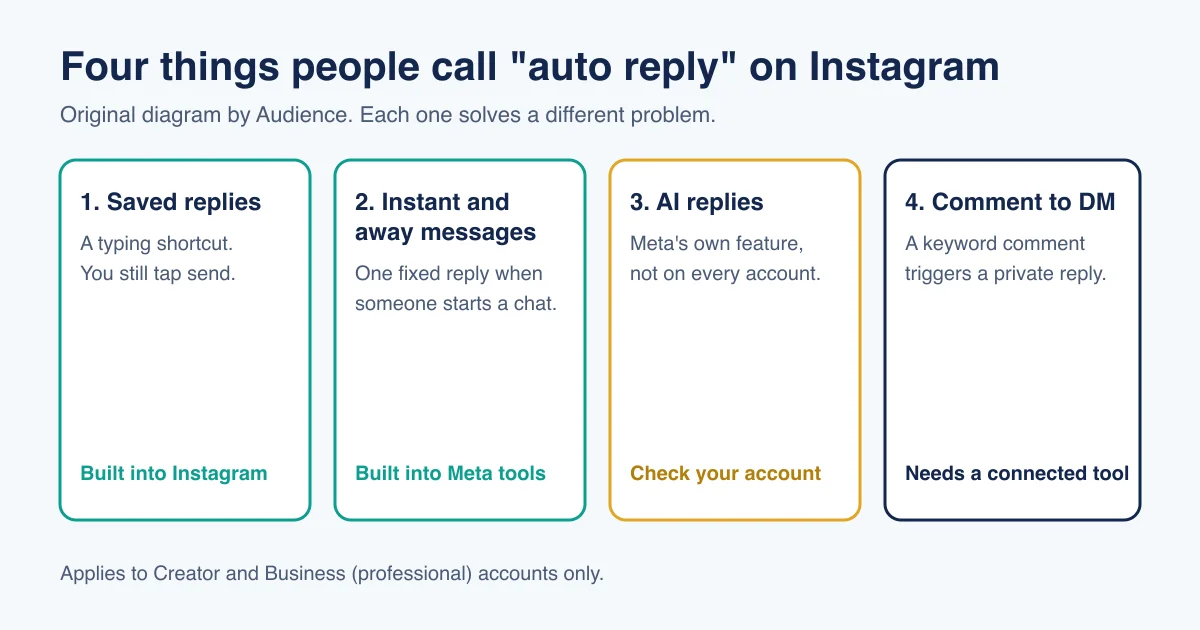
Auto reply on Instagram is any message sent without you typing it each time. It covers four features: saved replies, instant and away messages, Meta’s AI replies, and keyword comment-to-DM. Only the last one needs a tool that connects to Meta’s official API.
Here is how the four differ.
| Type | What it does | Who sends it | Needs a connected tool? |
|---|---|---|---|
| Saved replies | Inserts a pre-written answer when you tap it | You, by tapping send | No, built in |
| Instant and away messages | Sends one fixed reply when a new chat starts or you are offline | Instagram or Meta Business Suite | No, built in |
| AI replies | Drafts or sends answers from your business information | Meta’s AI | No, but not offered on every account |
| Comment-to-DM | Sends a DM when someone comments a keyword on your post | A connected app | Yes |
Source: Audience comparison, based on Meta’s developer documentation for private replies and Instagram’s in-app features. Menu names and feature availability change between app versions and countries, so check your own app before you plan around one.
All four work only on professional accounts, meaning Creator or Business. A personal account gets none of them. Switching is free and takes a minute in your account settings.
Before you start
Run through this checklist first. It saves you from the most common setup failures.
- Your account is a Creator or Business (professional) account.
- You know the five questions people ask you most often in DMs.
- You have written your working hours in Malaysia Time (MYT).
- You have a place to send people next: a WhatsApp number, a booking link or an email form.
- You can honestly reply to a person within one working day.
- You have a short privacy line ready, because you will collect contact details.
The last point matters in Malaysia. If you ask for a name, email or phone number, you are handling personal data under the Personal Data Protection Act 2010. Say what you will use it for, and do not message people who say no.
Step 1: Decide which job you want the reply to do
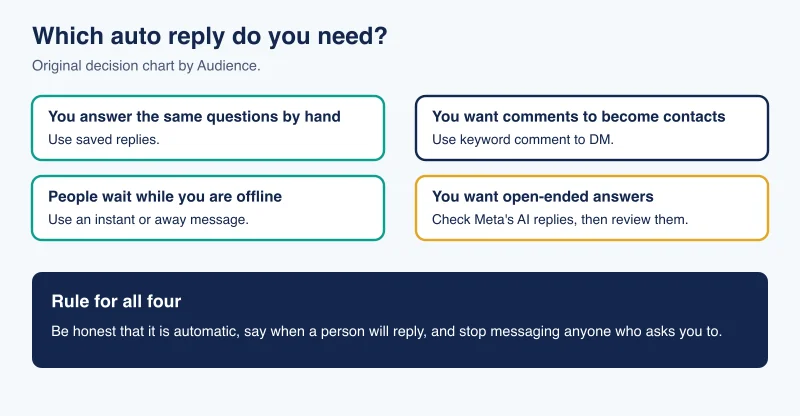
Start from the job, not the feature name.
If you keep typing the same answer, you need saved replies. If people message at night and hear nothing until morning, you need an instant or away message. If you want comments on a post to turn into contacts, you need comment-to-DM.
Pick one for week one. Do not set up all four at once. A coach who runs three half-built automations ends up with replies that contradict each other.
A useful test: count the DMs you answered last week. If more than half asked the same three questions, start with saved replies. It costs nothing and keeps a human in charge.
Step 2: Write your five saved replies
Saved replies are the lowest-risk start. You tap a short code, and a full answer appears in the message box. You read it, adjust it and send it.
Write five, one for each common question:
- Greeting and hours. “Hi, thanks for messaging. I reply Monday to Friday, 9am to 6pm (MYT).”
- What you offer. Two lines on who you help and what changes for them.
- Price and format. A range or “from” figure with what is included, for example “1-to-1 sessions from RM 150” if that is true for you.
- How to book. One link or one WhatsApp number, not three.
- Not a fit. A polite line that points people to a better option.
Keep each one under four lines. Long replies read like brochures and people stop answering.
In Malaysia, many people write in mixed English and Malay. Match the language of the person who messaged. If they open with “Hi kak, boleh tanya?”, answer in the same relaxed tone, not corporate English.
Step 3: Set an instant or away message
An instant reply goes out when someone starts a new chat. An away message covers the hours when you are offline. Both live in Instagram’s professional tools or in Meta Business Suite, depending on your account and app version.
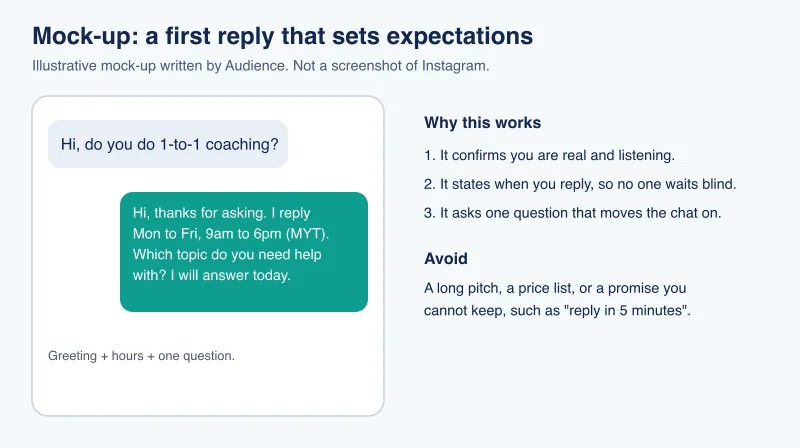
Write one message that does three things:
- Confirms you got it.
- States when a real person will reply, in MYT.
- Asks one question so the chat can move.
A working example for a trainer:
“Hi, thanks for your message. I reply Monday to Friday, 9am to 6pm (MYT). Which topic do you need help with: workshop, coaching or corporate training? I will answer today.”
Do not promise a speed you cannot keep. “I will reply within 5 minutes” turns into a broken promise by Tuesday. A set window is safer.
Step 4: Know what Meta’s AI replies can and cannot do
Meta offers AI-written replies to some professional accounts. Availability depends on your country and account, so look in your professional dashboard rather than assuming it is there.
Treat it as a draft engine. It can answer from information you supply, but it can also sound confident about details you never gave it, such as prices or session dates. If you switch it on, read every conversation for the first two weeks and fix the answers it gets wrong.
Never let an automatic tool give health, legal, tax or financial advice on your behalf. A wrong answer under your name is still your answer.
Step 5: Set up keyword comment-to-DM
This is the one that grows your list. You post a reel that says “Comment GUIDE and I will send you the checklist.” Someone comments GUIDE. A private message with your link arrives in their DMs.
Instagram does not do this natively. You need an app that connects to your account through Meta’s official API. Check four things before you connect any tool:
- It uses Instagram’s official login, not your password.
- It works with your account type, Creator or Business.
- You can see exactly what it sends, and you can edit the wording.
- You can download the contacts it collects.
Meta’s rules shape what any such tool can do. From Meta’s Private Replies documentation , updated 30 June 2026:
- Only one message can be sent to the commenter.
- It must be sent within 7 days of the comment.
- On Instagram Live, private replies can only be sent during the broadcast.
- Follow-up messages are allowed only if the person responds, and within 24 hours of their response.
- The reply lands in the Inbox if the person follows you, or in the Request folder if they do not.
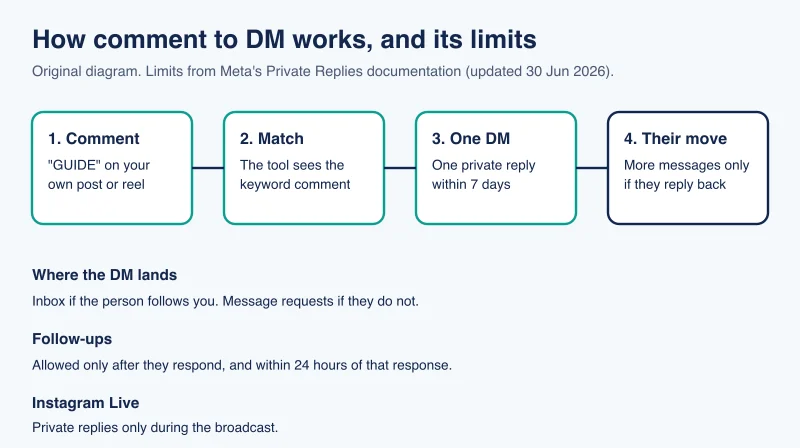
That last rule shapes your first message. You get one shot, so make it complete: the thing you promised, one clear next step, and a way to reach you.
Audience’s own app, Grow Your Audience , is built for this single job. Someone comments your keyword, they get your link by DM, and you keep their email or WhatsApp contact. It is an early product, so read its page for what is available today. You do not need it to use the other three types in this guide. For the wider plan on turning followers into an audience you own, see our guide to growing Instagram for a business .
Does this sound like your inbox? You post, people comment “price?”, and the answers come three days late. Pick the one feature that fixes that and set it up this week. It takes under an hour.
Step 6: Write the DM people receive
Your private reply is a promise kept. Keep it short:
- Say hi and name the thing they asked for.
- Give the link or the answer.
- Ask for one small action, such as “Reply YES if you want the Malay version”.
- Add opt-out wording: “Reply STOP and I will not message you again.”
Example for a consultant:
“Hi! Here is the pricing guide you asked for: [link]. If you want to talk it through, reply with your best time for a 15-minute call (MYT). Reply STOP any time and I will not message you again.”
If you hand people to WhatsApp, say so plainly: “I will continue on WhatsApp so I can send voice notes.” Do not add anyone to a broadcast list without their yes. For email, the same rule applies, and our guide to growing an email list shows lead-magnet ideas that earn the sign-up.
Step 7: Test every path before you tell anyone
Use a second account. Comment the keyword on your own post and watch what arrives. Check four things:
- The message arrives, and it arrives in the Inbox or Requests folder as you expect.
- The link works on mobile data, not only on your Wi-Fi.
- The wording matches what the post promised.
- Typing your keyword in capitals, lowercase and with a space after it all works.
Then test the human path. Reply to the DM like a customer and confirm that you see it in your inbox. Many setups send the first message well and then drop the conversation.
Step 8: Review the numbers after two weeks
Check what the setup did. Count how many comments used your keyword, how many people replied to the DM, and how many booked or signed up. If your account is small, these numbers will be small, and that is fine. You are testing whether the reply moves people one step forward.
Edit the weakest message first. Most of the time it is the first line of the DM or the call to action. Change one thing at a time so you know what worked.
Your profile should support the same story. If your bio says one thing and the DM another, people hesitate. Use the Instagram bio generator to tighten the promise and the call to action.
What are the most common auto reply mistakes?
These four mistakes cost experts the most trust.
1. Sounding like a robot
“Dear valued customer” in a DM kills the chat. Write the way you would speak to one person at a workshop.
2. Replying to everything with a sales pitch
Someone asking “what time do you start?” does not want a package list. Answer the question first, then offer the next step.
3. Messaging people who never asked
Comment-to-DM works because the person raised their hand. Sending mass DMs to people who did not ask is spam, and it can get your account restricted. Meta’s rules also limit you to one private reply per comment.
4. Setting it up and never checking
Offers change. A link breaks. Your hours move. Put a monthly reminder in your calendar to read every automatic message once.
Frequently Asked Questions
Can you set up auto reply on Instagram for free?
Yes, for three of the four types. Saved replies, instant or away messages and Meta’s AI replies are built into Instagram and Meta’s business tools without a separate fee. Keyword comment-to-DM needs a connected app, and each app sets its own price. Check availability on your account first.
Does Instagram have a built-in auto reply for comments?
No. Instagram’s built-in features cover messages, not comments. To send a DM when someone comments a keyword, you need an app that uses Meta’s official API. Under Meta’s rules, that app can send one private reply per comment, within 7 days of the comment.
Is it safe to use an Instagram auto reply tool?
It is safe if the tool connects through Instagram’s official login and sends only to people who commented or messaged you. Avoid any tool that asks for your password. Read what it sends, and stop messaging anyone who opts out. Your account stays your responsibility.
Do I need a Business account for auto reply?
You need a professional account, which means Business or Creator. Personal accounts do not get saved replies, away messages or comment-to-DM. Switching takes about a minute in settings, does not cost anything and does not delete your posts or followers.
Can I send follow-up messages after the first auto reply?
Only if the person replies. Under Meta’s Private Replies rules, follow-up messages are allowed after the person responds, and they must go out within 24 hours of that response. Without a reply, the first private reply is the only message you can send.
Keep Reading
- How to Grow Instagram Followers for Business
- How to Grow an Email List
- Instagram Bio Generator for Creators
- Build an Audience From Zero
Updated 24 November 2026. Meta changes Instagram’s features and limits often, so check the linked Meta documentation before you build around a number.
What to Do Next
Choose the path that fits where you are right now.
Get the Instagram Algorithm Decoder
Score your last 10 Instagram posts against the six signals Instagram rewards now, then fix the weakest signal first.
Get the Instagram DecoderGet the Instagram Algorithm Decoder
Get the free Instagram PDF with six ranking signals, approximate weights, and a self-audit for your last 10 posts.
Get the Instagram Algorithm Decoder